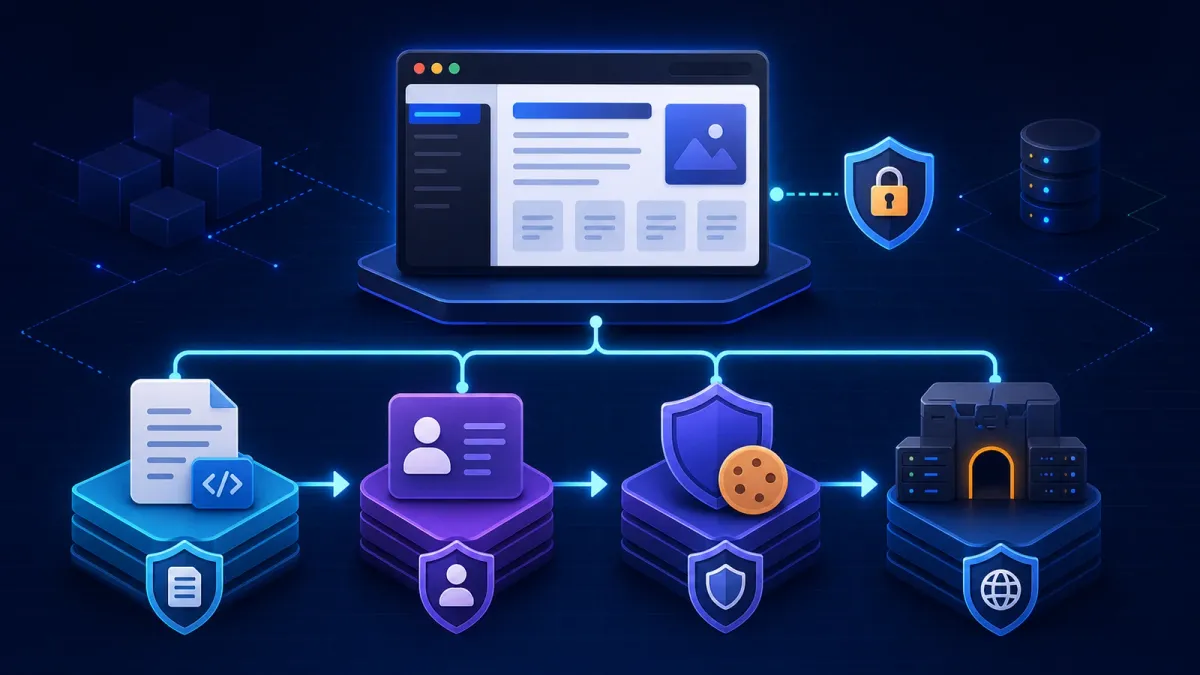
We wanted a maintainable internal documentation site for HTTP APIs, Kafka messages, authentication guides, error codes, deployment manuals, troubleshooting notes, and release history.
Docusaurus is an excellent static documentation generator, but a static site has no server-side authorization layer. Putting login checks in the browser would be insecure and would force the documentation project to own responsibilities that belong elsewhere. I therefore split the system into four layers:
| Component | Responsibility |
|---|---|
| Docusaurus | Generate and serve the static documentation |
| Casdoor | Manage organizations, users, applications, and sign-in |
| oauth2-proxy | Handle OIDC login, callbacks, and Cookie sessions |
| Nginx | Terminate HTTPS, proxy requests, serve static files, and protect the whole site |
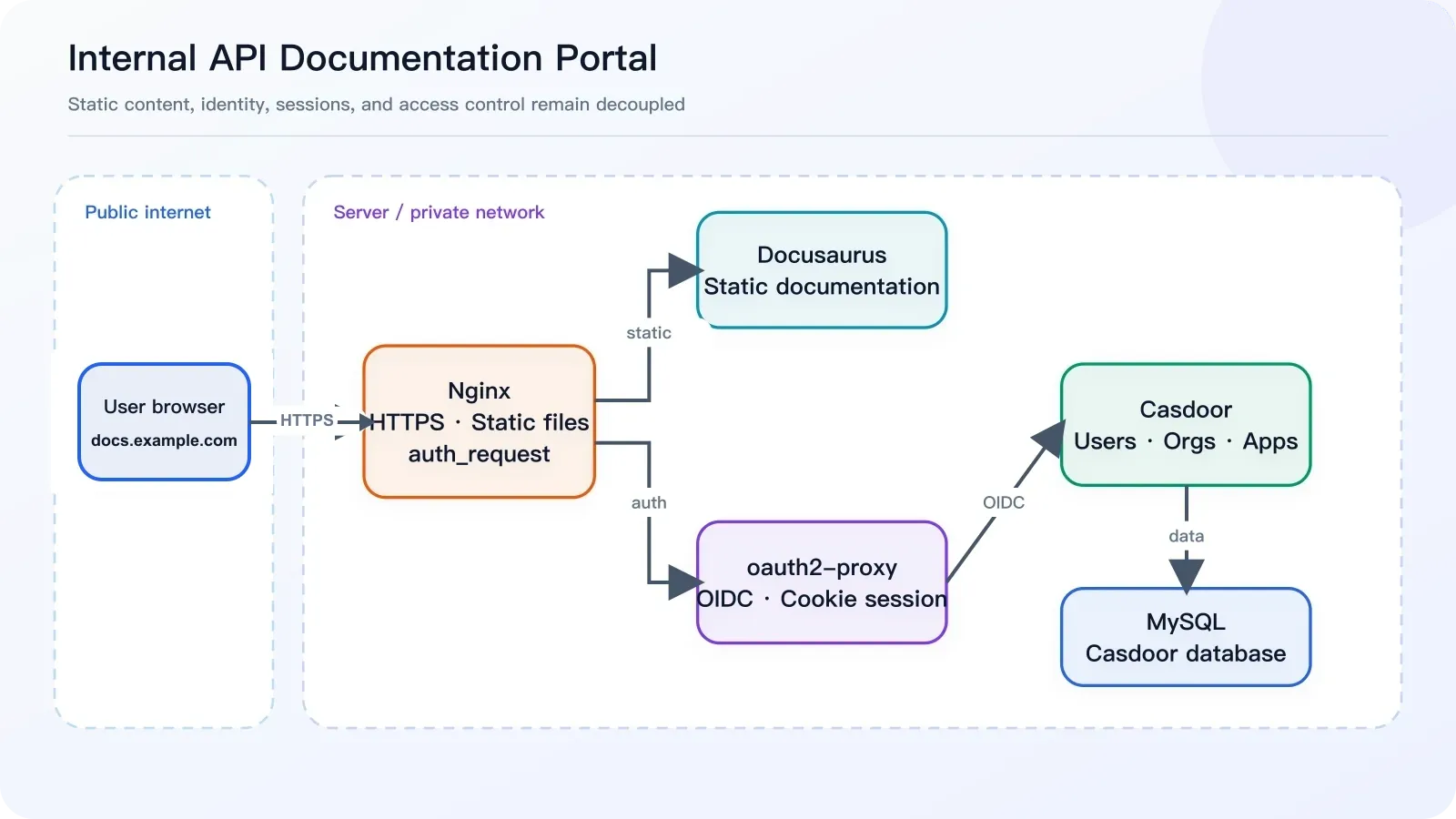
Figure 1: Overall architecture. The browser talks only to Nginx; the static files, authentication proxy, and identity service stay on the server side.
The final request flow looks like this:
User opens https://docs.example.com
  ↓
Nginx issues an auth_request
  ↓
oauth2-proxy checks the session
  ↓ not signed in
Redirect to https://auth.example.com for Casdoor authentication
  ↓
Callback to https://docs.example.com/oauth2/callback
  ↓
oauth2-proxy sets a Cookie; Nginx serves the Docusaurus files
The setup uses two subdomains: auth.example.com for Casdoor and docs.example.com for the protected documentation site.
1. Deploy Docusaurus
Running npm run build produces a build/ directory. Deploy the contents of that directory, not the directory itself:
/var/www/openapi-docs/index.html
/var/www/openapi-docs/404.html
/var/www/openapi-docs/assets/
/var/www/openapi-docs/docs/
Do not end up with /var/www/openapi-docs/build/index.html.
Because the site is served from the domain root, configure docusaurus.config.ts as follows:
export default {
  url: "https://docs.example.com",
  baseUrl: "/",
};
Using baseUrl: '/openapi/' makes the browser report that the configured base URL does not match the actual path. After fixing it, rebuild and deploy:
npm run build

rm -rf /var/www/openapi-docs/*
cp -r build/* /var/www/openapi-docs/
chown -R www-data:www-data /var/www/openapi-docs
nginx -t
systemctl reload nginx
Before clearing the directory, verify the target carefully and use the backup or atomic-release policy appropriate for your production environment.
2. Deploy and Configure Casdoor
Casdoor provides centralized authentication. For the first phase, we only enabled password login and deliberately postponed third-party providers to keep the system simple.
Casdoor is available publicly at https://auth.example.com, while its container port is bound only to 127.0.0.1:8000 and exposed through Nginx. Complete these steps in its admin console:
- Create an organization named
internal. - Create a user in that organization, such as
internal/zhangyuliang. - Create an OAuth application named
dev-portaland bind it tointernal. - Enable the password provider.
- Set the Redirect URL to
https://docs.example.com/oauth2/callback. - Save the generated Client ID and Client Secret for oauth2-proxy.
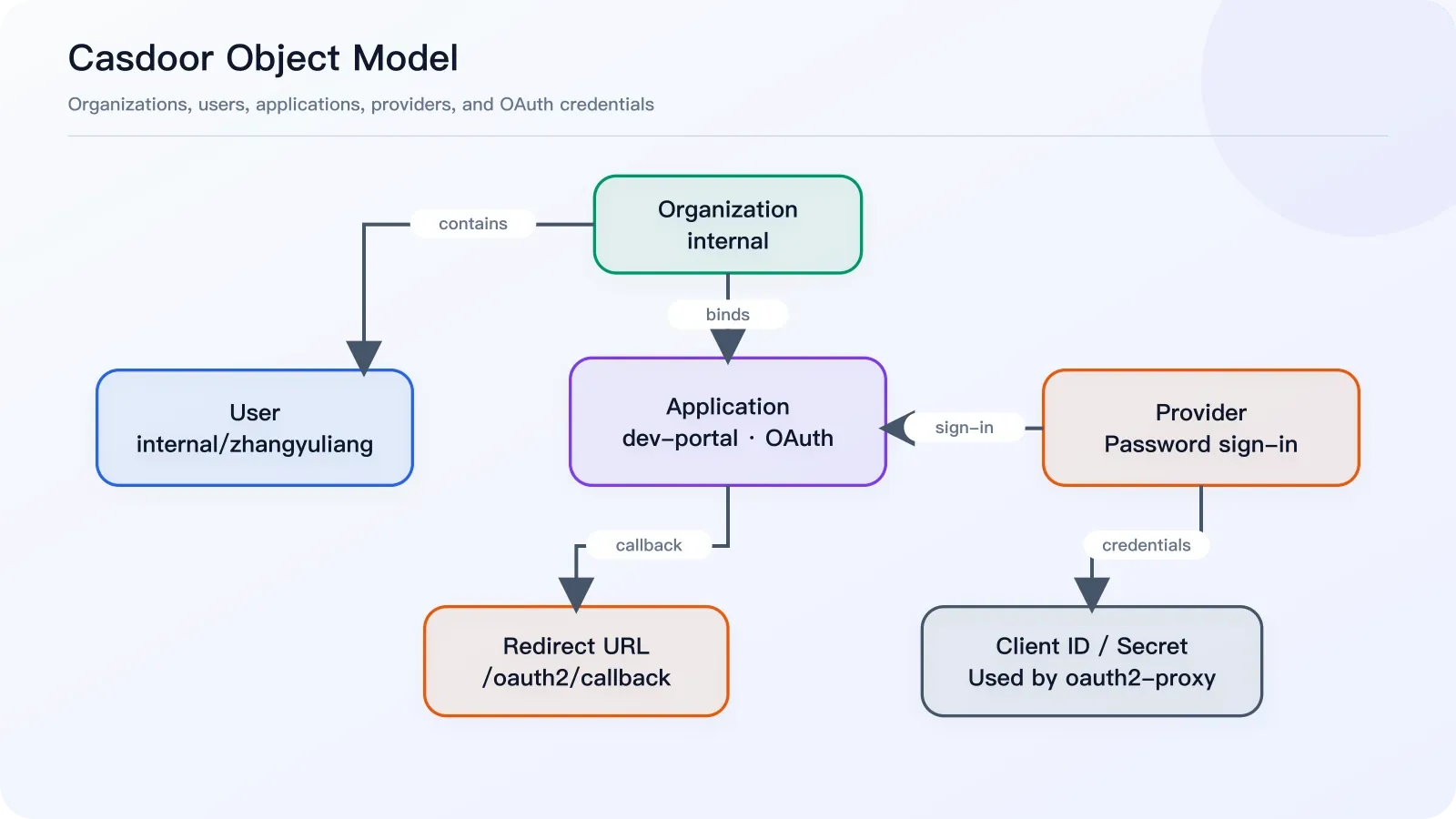
Figure 2: Casdoor’s object model. A user belongs to an organization; the application binds the organization and login provider, then supplies its callback and credentials to oauth2-proxy.
Do not use https://auth.example.com/oauth2/callback. The callback is handled by oauth2-proxy on the documentation domain, not by Casdoor itself.
One detail can be confusing: opening https://auth.example.com/login directly takes you to the built-in organization’s login page. Entering zhangyuliang there makes Casdoor search for built-in/zhangyuliang, not internal/zhangyuliang.
To test an internal user directly, open:
https://auth.example.com/login/internalNormal users do not need this URL. When they visit the documentation site, oauth2-proxy starts the correct OAuth flow automatically.
3. Configure oauth2-proxy
oauth2-proxy connects Nginx to Casdoor. In this setup, it lives under /opt/oauth2-proxy/, with its configuration at /opt/oauth2-proxy/oauth2-proxy.cfg:
http_address = "0.0.0.0:4180"
provider = "oidc"
provider_display_name = "Casdoor"

client_id = "replace with the Casdoor Application Client ID"
client_secret = "replace with the Casdoor Application Client Secret"

oidc_issuer_url = "https://auth.example.com"
redirect_url = "https://docs.example.com/oauth2/callback"
scope = "openid email profile"

email_domains = [ "*" ]
whitelist_domains = [ "docs.example.com" ]

# Temporary compatibility option while email addresses remain unverified
insecure_oidc_allow_unverified_email = true

cookie_name = "_oauth2_proxy_docs"
cookie_secret = "replace with a randomly generated cookie secret"
cookie_secure = true
cookie_httponly = true
cookie_samesite = "lax"

reverse_proxy = true
skip_provider_button = true
set_xauthrequest = true

upstreams = [
  "static://202"
]
Generate a Cookie secret with:
openssl rand -base64 32 | tr -- '+/' '-_'Use this Docker Compose file:
services:
  oauth2-proxy:
    image: quay.io/oauth2-proxy/oauth2-proxy:v7.15.3
    container_name: oauth2-proxy
    restart: unless-stopped
    ports:
      - "127.0.0.1:4180:4180"
    volumes:
      - ./oauth2-proxy.cfg:/etc/oauth2-proxy/oauth2-proxy.cfg:ro
    command:
      - --config=/etc/oauth2-proxy/oauth2-proxy.cfg
Start it and inspect the logs:
cd /opt/oauth2-proxy
docker compose up -d
docker logs -f oauth2-proxy
Check the authentication endpoint:
curl -I http://127.0.0.1:4180/oauth2/authAn unauthenticated request should return HTTP/1.1 401 Unauthorized. That response confirms the endpoint is working.
4. Protect docs.example.com with Nginx
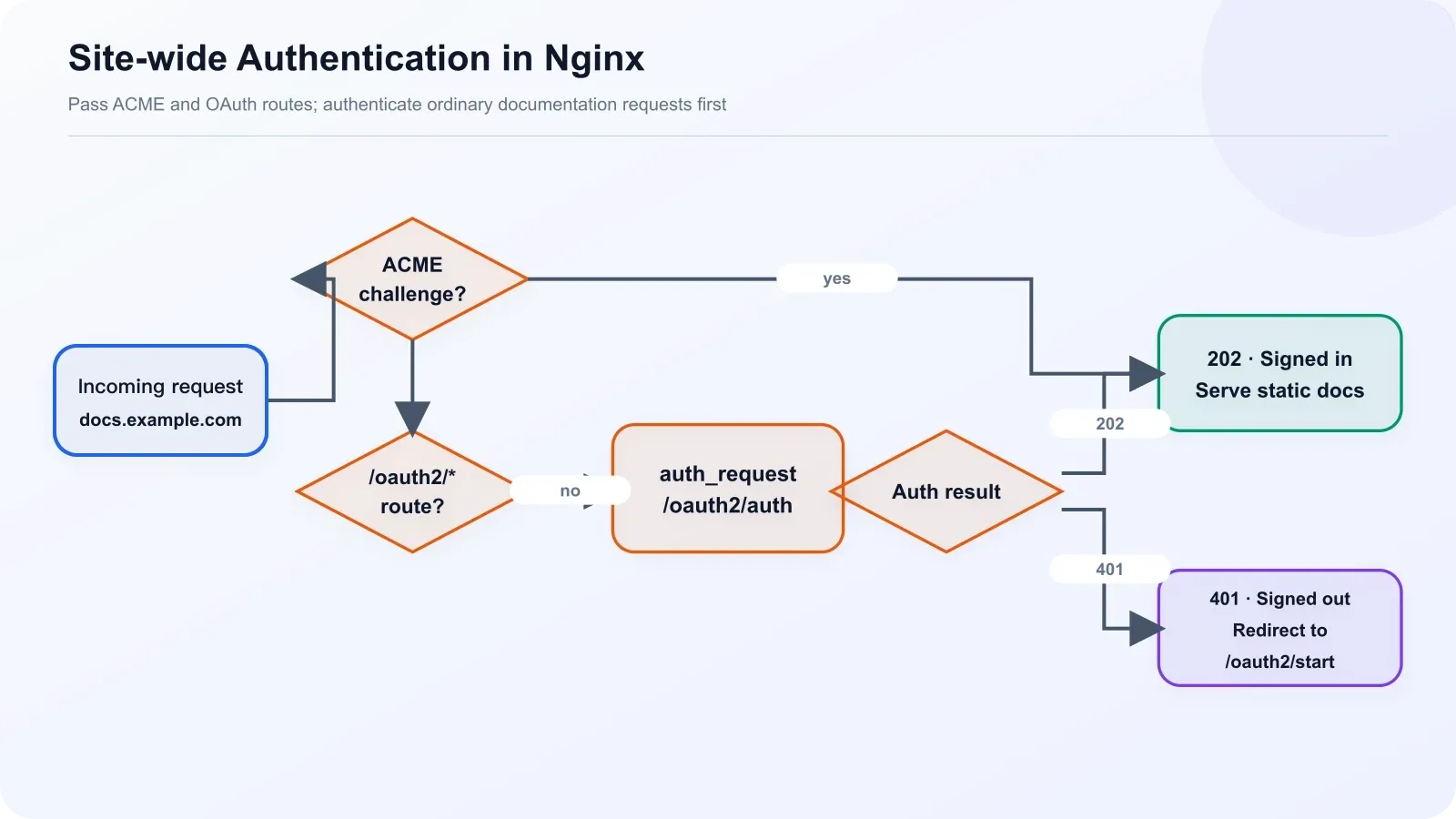
Figure 3: Nginx authentication flow. ACME and OAuth routes are passed through, while ordinary pages use auth_request and continue according to a 202 or 401 response.
There are only three essential routing rules:
- allow
/.well-known/acme-challenge/for certificate validation; - proxy
/oauth2/to oauth2-proxy; - authenticate
/through the internal/oauth2/authendpoint before serving Docusaurus files.
The complete configuration is below. Replace the certificate paths for your environment:
upstream docs_oauth2_proxy_backend {
    server 127.0.0.1:4180;
    keepalive 32;
}

server {
    listen 80;
    server_name docs.example.com;

    location ^~ /.well-known/acme-challenge/ {
        root /www/server/stop;
        allow all;
    }

    location / {
        return 301 https://$host$request_uri;
    }
}

server {
    listen 443 ssl http2;
    server_name docs.example.com;

    ssl_certificate /etc/ssl/example.com_bundle.pem;
    ssl_certificate_key /etc/ssl/example.com.key;
    ssl_protocols TLSv1.2 TLSv1.3;
    ssl_session_cache shared:SSL:10m;
    ssl_session_timeout 10m;
    ssl_prefer_server_ciphers on;
    ssl_ciphers HIGH:!aNULL:!MD5;

    add_header Strict-Transport-Security "max-age=31536000" always;
    error_page 497 https://$host$request_uri;

    access_log /var/log/nginx/docs.example.com.access.log;
    error_log /var/log/nginx/docs.example.com.error.log;

    root /var/www/openapi-docs;
    index index.html;
    client_max_body_size 50m;

    proxy_buffer_size 256k;
    proxy_buffers 16 256k;
    proxy_busy_buffers_size 512k;

    location ^~ /.well-known/acme-challenge/ {
        root /www/server/stop;
        allow all;
    }

    location ^~ /oauth2/ {
        proxy_pass http://docs_oauth2_proxy_backend;
        proxy_http_version 1.1;
        proxy_set_header Host $host;
        proxy_set_header X-Real-IP $remote_addr;
        proxy_set_header X-Scheme $scheme;
        proxy_set_header X-Forwarded-Proto $scheme;
        proxy_set_header X-Forwarded-For $proxy_add_x_forwarded_for;
        proxy_set_header X-Auth-Request-Redirect $scheme://$host$request_uri;

        proxy_buffer_size 256k;
        proxy_buffers 16 256k;
        proxy_busy_buffers_size 512k;
    }

    location = /oauth2/auth {
        internal;
        proxy_pass http://docs_oauth2_proxy_backend;
        proxy_http_version 1.1;
        proxy_set_header Host $host;
        proxy_set_header X-Real-IP $remote_addr;
        proxy_set_header X-Scheme $scheme;
        proxy_set_header X-Forwarded-Proto $scheme;
        proxy_set_header X-Forwarded-For $proxy_add_x_forwarded_for;
        proxy_set_header X-Forwarded-Uri $request_uri;
        proxy_set_header Content-Length "";
        proxy_pass_request_body off;

        proxy_buffer_size 256k;
        proxy_buffers 16 256k;
        proxy_busy_buffers_size 512k;
    }

    location / {
        auth_request /oauth2/auth;
        error_page 401 = @oauth2_start;

        auth_request_set $auth_user $upstream_http_x_auth_request_user;
        auth_request_set $auth_email $upstream_http_x_auth_request_email;
        add_header X-Auth-User $auth_user;
        add_header X-Auth-Email $auth_email;

        try_files $uri $uri.html $uri/ /404.html;
    }

    location @oauth2_start {
        return 302 /oauth2/start?rd=$scheme://$host$request_uri;
    }

    location ~ ^/(\.user\.ini|\.htaccess|\.git|\.env|\.svn|\.project|LICENSE|README\.md|package\.json|package-lock\.json|yarn\.lock|pnpm-lock\.yaml)$ {
        return 404;
    }

    location ~ ^/\.well-known/.*\.(php|jsp|py|js|css|lua|ts|go|zip|tar\.gz|rar|7z|sql|bak)$ {
        return 403;
    }
}
Apply the configuration:
nginx -t
systemctl reload nginx
At the network boundary, only Nginx ports 80 and 443 should be public. Keep oauth2-proxy on 4180 and Casdoor on 8000 bound to localhost, and restrict MySQL port 3306 with a security group or firewall.
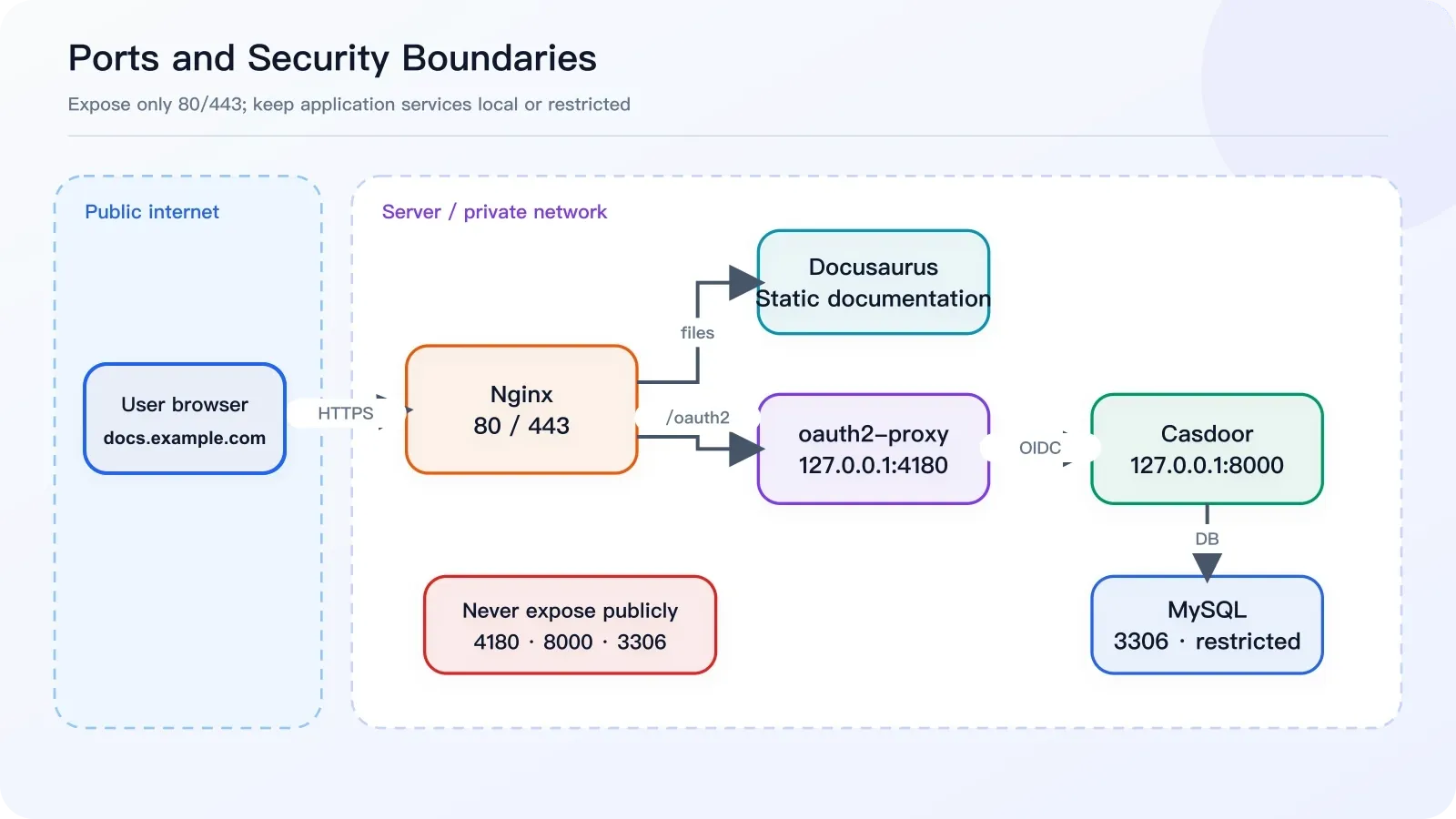
Figure 4: Port and security boundaries. Only ports 80 and 443 are public; 4180, 8000, and 3306 are not exposed directly to the internet.
5. Five Problems We Encountered
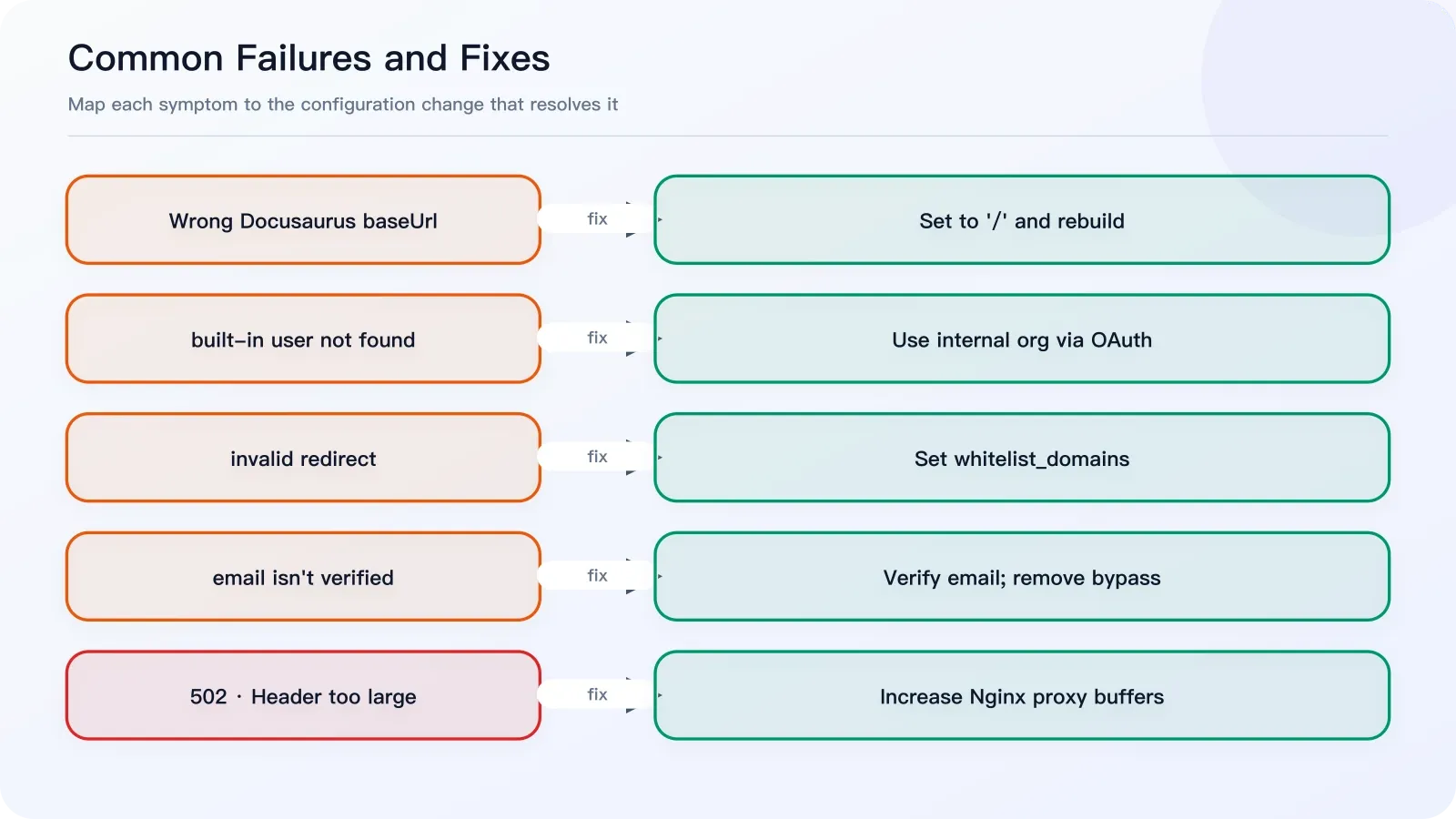
Figure 5: Five access failures and the corresponding fixes.
5.1 Incorrect Docusaurus baseUrl
Symptom: the page reports Current configured baseUrl = /openapi/.
Cause: the site was built for /openapi/ but served from the domain root.
Fix: set baseUrl: '/', rebuild, and replace the deployed static files.
5.2 Casdoor’s default login searches the built-in organization
Symptom: Casdoor says built-in/zhangyuliang does not exist.
Cause: /login belongs to the built-in organization by default.
Fix: continue using built-in/admin for administration and place documentation users under internal. In production, let oauth2-proxy initiate login instead of opening /login manually.
5.3 oauth2-proxy reports an invalid redirect
Log message:
Rejecting invalid redirect "https://docs.example.com/": domain / port not in whitelistAdd this setting:
whitelist_domains = [ "docs.example.com" ]5.4 oauth2-proxy rejects an unverified email address
The log says email in id_token (...) isn't verified because Casdoor returned email_verified=false.
As a temporary workaround, set insecure_oidc_allow_unverified_email = true. The long-term fix is to mark the user’s email as verified in Casdoor and then remove this permissive option.
5.5 Nginx returns 502 after the login callback
The error log contains:
upstream sent too big header while reading response header from upstreamThe Cookie and headers written during the oauth2-proxy callback can exceed Nginx’s default buffers. Add the following settings globally and inside both /oauth2/ and /oauth2/auth:
proxy_buffer_size 256k;
proxy_buffers 16 256k;
proxy_busy_buffers_size 512k;
6. Post-deployment Verification
First, check Casdoor’s OIDC discovery endpoint:
curl -I https://auth.example.com/.well-known/openid-configurationIt should return 200. Then test oauth2-proxy:
curl -I http://127.0.0.1:4180/oauth2/authIt should return 401 while you are signed out. Finally, open https://docs.example.com in an incognito window. The complete flow should be:
Redirect to auth.example.com
  ↓
Enter credentials for a user in the internal organization
  ↓
Complete sign-in and return to docs.example.com
  ↓
View the Docusaurus documentation site
7. Ongoing Maintenance
Once authentication is stable, routine maintenance is mostly about Docusaurus content. The deployment flow can be wrapped in a script:
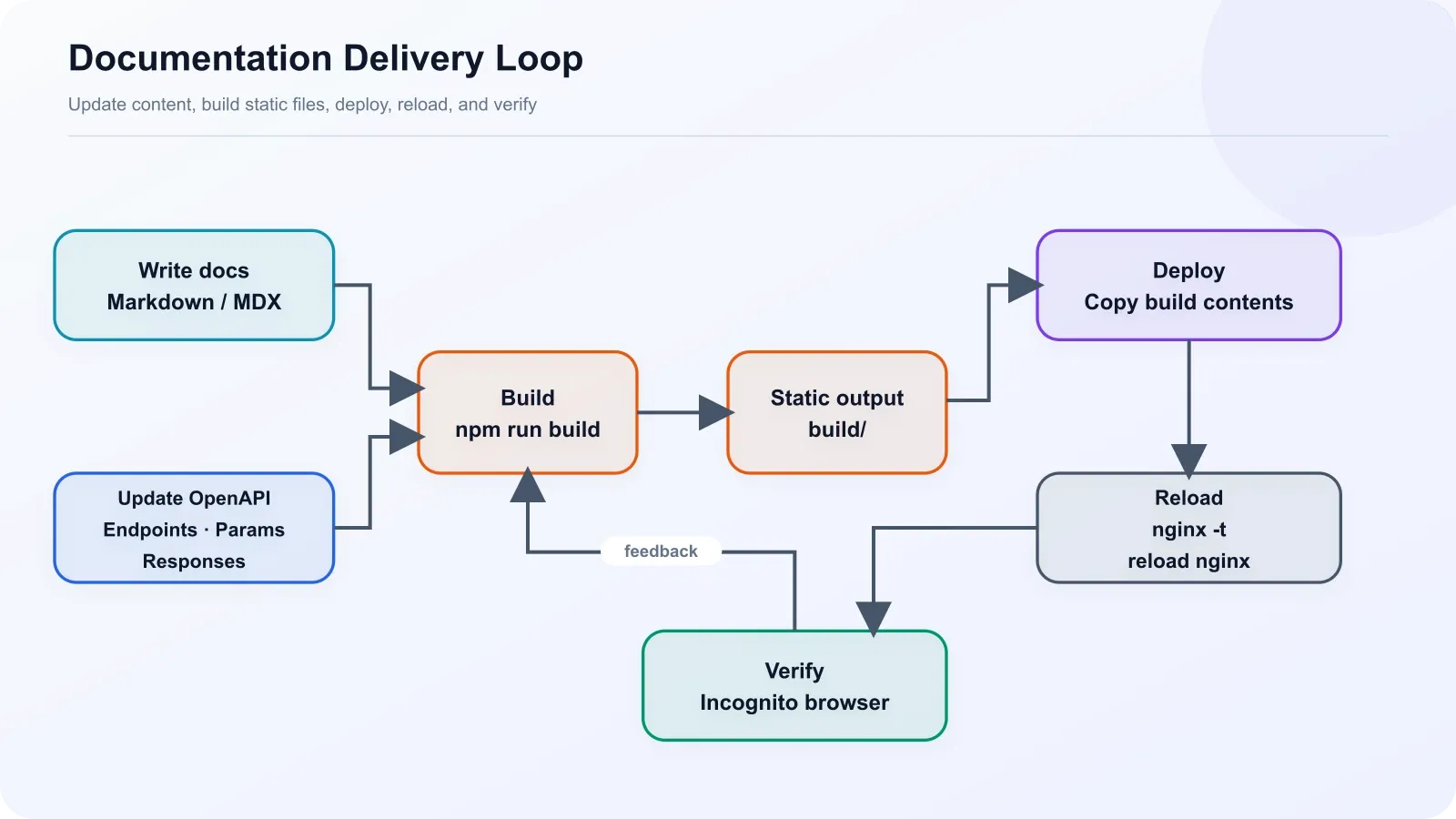
Figure 6: Documentation maintenance flow, covering content updates, build, deployment, and production verification.
#!/usr/bin/env bash
set -e

APP_DIR="/opt/openapi-docs"
WEB_DIR="/var/www/openapi-docs"

cd "$APP_DIR"
npm run build

rm -rf "$WEB_DIR"/*
cp -r build/* "$WEB_DIR"/
chown -R www-data:www-data "$WEB_DIR"

nginx -t
systemctl reload nginx

echo "Docusaurus docs deployed."
For production, you can improve this further by deploying to timestamped release directories and switching a symlink. That keeps the previous version available for a fast rollback.
Conclusion
This architecture keeps the documentation site entirely static while assigning identity, sessions, and access control to dedicated components. Casdoor centralizes users, oauth2-proxy owns the OIDC session, and Nginx protects the whole site. No login code is needed inside Docusaurus, and the authentication layer can later protect other internal tools such as n8n, ShowDoc, Hoppscotch, or RuoYi.
At the end of the first phase, anonymous users cannot reach the documentation, authenticated users can browse it normally, and content remains decoupled from access control. The next priority is no longer rebuilding the login system; it is continuously improving the documentation until the site becomes a genuinely reusable internal developer portal.
